Problem
Case study / v0.6.0 released local-first prototype
Neutro
A local-first, user-controlled interface adaptation prototype with transparent profiles and explainable changes.
Target user
People who want direct control over presentation preferences in one browser.
Solution
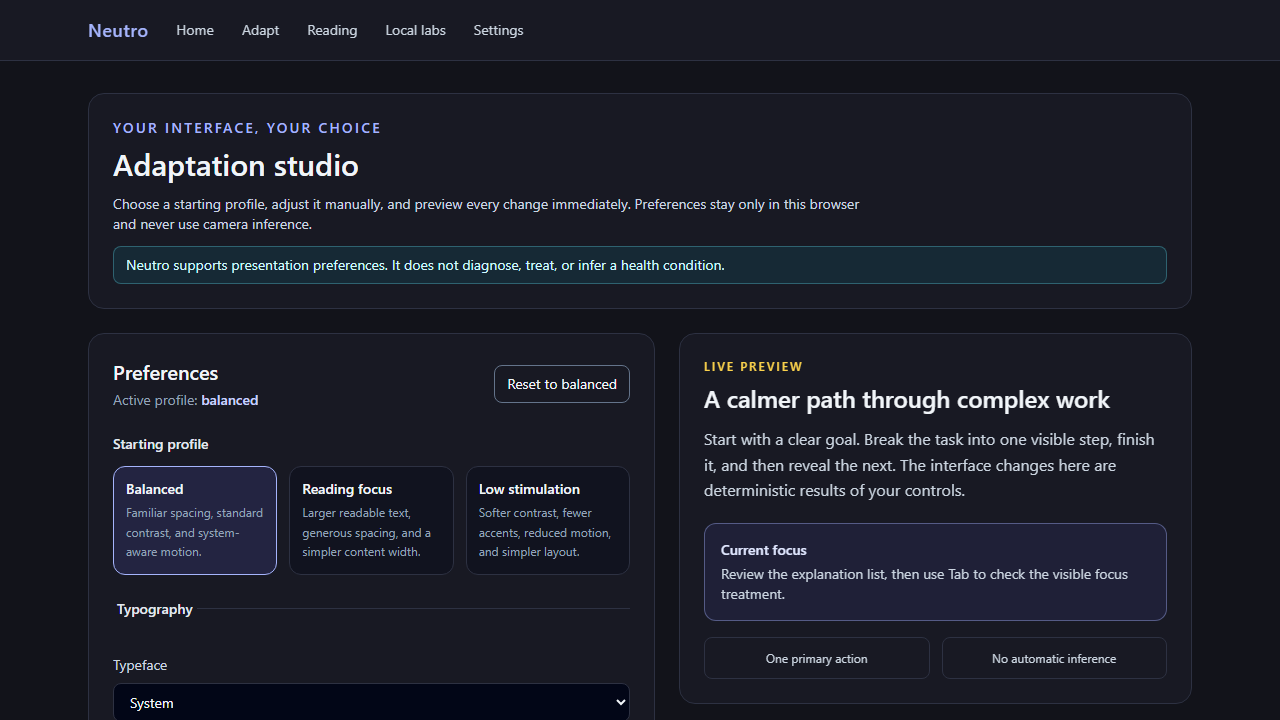
A deterministic adaptation studio for typography, contrast, motion, sensory load, layout, and focus assistance with live preview, explanations, persistence, and reset.
Personal contribution
Refocused the product around explicit user choice; implemented the preference engine, provider, accessible workflow, persistence recovery, tests, performance split, documentation, and narrated release evidence.
Architecture
Boundaries before buzzwords.
- Pure preset, normalization, and explanation rules
- React provider mapping state to CSS variables and document attributes
- Versioned local browser persistence
- Route-split optional reading, replay, and camera labs
Main workflow
State moves with a reason.
- 01
Choose a transparent starting profile
- 02
Override any presentation dimension
- 03
Inspect the live preview and explanations
- 04
Reload to confirm local persistence
- 05
Reset completely to Balanced
Technical decisions
The trade-offs that define the system.
- Manual changes always become an explicit Custom profile
- System reduced motion is never overridden by forced motion
- Camera heuristics cannot change adaptation preferences or trigger automatic intervention
- Optional labs load separately from the primary workflow
Difficult engineering challenge
The product needed to make adaptation immediately useful while keeping every transformation user-controlled, reversible, explainable, and free of unsupported medical inference.
Verification
Evidence and boundaries.
Testing
- 6 deterministic Vitest cases
- Desktop persistence/reset Playwright workflow
- 390×844 overflow and keyboard-focus check
- Canonical and legacy lint/build CI
- 0 known npm vulnerabilities
Security and privacy
- Preferences remain in versioned browser storage
- Camera and replay are off by default and require explicit user action
Known limitations
- Preferences do not sync across browsers or devices
- No clinical validation, health outcome, or cross-platform desktop claim
Focused future work
- Add automated accessibility scanning and broader assistive-technology/browser evidence
Verified demonstration
Rendered product behavior.
Loading video metadata…